Adaapt AI is now Ekva.
Ekva Enterprise AI™
THE PLATFORM

Build enterprise AI
around your
workflows.

Ekva Enterprise AI is designed to connect automation, intelligence, and governance with your existing enterprise stack. Integration availability and scope are confirmed for each deployment.

ARCHITECTURE

Ekva Enterprise AI sits on top
of your existing stack.

Explore integration options for existing systems and data. Connector availability, read/write actions, migration work, and changes to source models depend on the systems and deployment selected.

BUSINESS OUTCOMES
Finance & Treasury
HR & People Ops
Supply Chain & Ops
Sales & Revenue
Risk & Compliance
Customer Experience
EKVA PLATFORMReview deployment options · Map data flows · Validate applicable controls
Automation Platform
Workflow Builder
AI Agent Workflows
Enterprise Integrations
Data Management
Intelligence Layer
AI Analytics & BI
AI Inbox
AI Monitor
Knowledge Base
AI Governance
Model Management
Access & Audit Controls
Privacy Controls
Evidence Exports
YOUR EXISTING INFRASTRUCTURE — UNTOUCHED
SAP ERP
ERP
Salesforce
CRM
Oracle
ERP/DB
ServiceNow
ITSM
Workday
HRMS
Microsoft 365
Productivity
Snowflake
Data Warehouse
Additional systems
confirm availability
✓Bidirectional sync — reads and writes to existing systems
✓No ETL, no data migration, no schema changes
✓Deploys on-prem, private VPC, or air-gapped
AUTOMATION PLATFORM

Build AI workflows, deploy
agents, connect every system.

Without writing a line of code. Ekva Enterprise AI's Automation Platform is the execution engine — it orchestrates processes across every system in your enterprise stack.

WORKFLOW BUILDER

Design workflows around your team's processes.

A visual workflow builder can connect supported systems and define triggers, actions, approvals, and exception paths. Confirm available steps and operational controls for your use case.

  • ■Map workflow steps to supported systems
  • ■Define approvals and exception handling
  • ■Review execution records and monitoring options
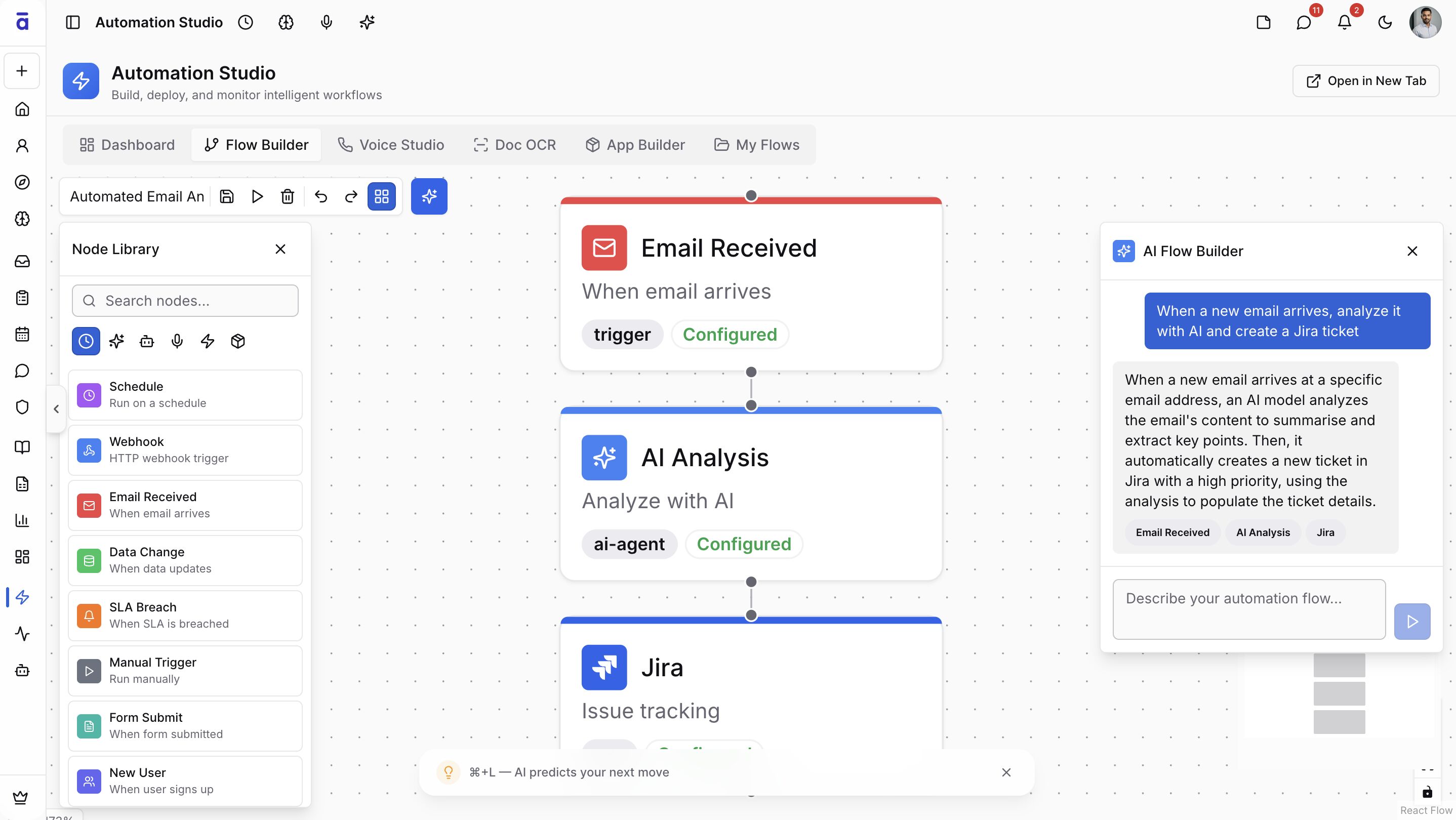
Automation Studio — Ekva
Automation Studio
INTELLIGENCE LAYER

Holistic insights across
every system you own.

Because Ekva Enterprise AI connects every system into one data model, it can surface anomalies, trends, and risks that no single-system BI tool can see — before the business feels them.

AI ANALYTICS & BI

Insights across every system — surfaced before you ask.

Because every system feeds one data layer, Ekva Enterprise AI detects cross-functional anomalies and revenue risks automatically. Finance, Ops, HR, and Sales on one live data model.

  • ■Proactive anomaly detection — no manual queries needed
  • ■Natural language questions + AI-recommended next actions
  • ■4× faster reporting cycle vs. manual BI tools
  • ■Cross-system KPIs on a single live dashboard
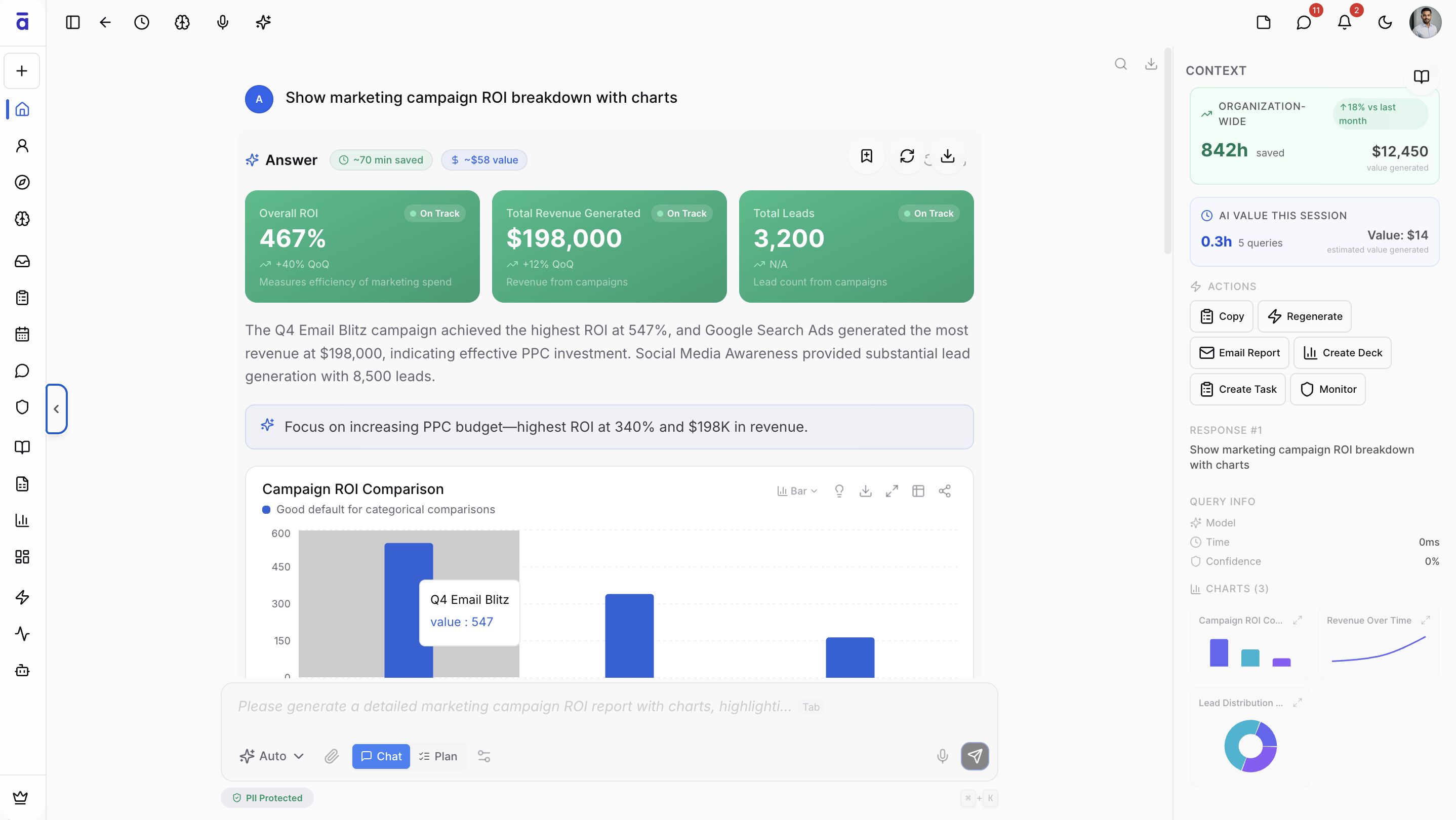
AI Analytics & Insights — Ekva
AI Analytics & Insights
Contextual Intelligence
Ekva AI · Proprietary

Your data never goes to public AI. Ever.

Every query is classified and routed automatically — before any model is called — based on sensitivity and compliance boundary. Regulated data is air-gapped. No configuration. No exceptions.

Query type
Example use cases
Model routed to
Cost
Routine Task
Invoice classification, report summarisation, FAQ lookup
Lightweight On-Prem Model
Near-zero
Complex Reasoning
Legal analysis, strategic synthesis, cross-system planning
Advanced Reasoning Model
Optimised
Regulated Data
Patient records, financial data, HR information
Air-Gapped On-Prem Only
Zero egress
Zero
Data egress
For regulated & sensitive queries
<200ms
Routing decision
Per query, fully automated
40–60%
AI cost reduction
Avg. in first quarter
Intelligent Cost Shaping

AI costs that are predictable by design.

Consumption-based AI billing is non-linear. A complex query costs 50× more than a simple one. Enterprises can't budget "per AI call." Ekva solves this at the architecture level — not with dashboards after the fact.

Without Ekva
Monthly AI bill:
"You used 4.2M tokens this month."
Next month estimate: unknown
Cost per workflow: unknown
Budget overrun risk: unknown
With Ekva
Your AI budget: $2,000/month
Forecast: $1,840 ± $120
3 features consuming 60% of budget →
Switch 2 workflows to cached responses →
Save $340/month · zero quality loss
The 5-lever framework for predictable AI costs
Status
Lever
How it works
Cost impact
Live
Smart Routing
Simple queries go to cheap on-prem models. Complex reasoning escalates to advanced models only when it changes the outcome.
−60 to −80% on routine queries
Live
Response Caching
Identical and semantically similar queries reuse cached answers. Teams sharing questions automatically share compute.
−20 to −40% for high-repetition teams
Live
Context Compression
Long conversation history is summarised before being sent to the model. Shorter context = lower token cost, no loss of continuity.
−30% on long conversations
Live
Proactive Pre-computation
Likely answers are generated during off-peak hours and served instantly at peak time — shifting compute cost to low-demand windows.
−15% on peak-hour costs
Live
Budget Governor
Admin sets a monthly ceiling. As spend approaches the limit, the system automatically shifts remaining queries to lower-cost models — no surprise invoices.
Hard ceiling on monthly AI spend
Platform Architecture

How Ekva thinks — and acts.

A single context graph connects every signal in your organisation. Three intelligence modes consume it. One cost layer keeps spend predictable.

Context Graph
Live unified model of your organisation
IAMUser role
CALOrg calendar
PRJActive projects
MEMHistorical decisions
SIGTeam signals
EXTExternal data
6
signal sources
01
Automation
Act before asked
Agents trigger workflows the momentcontext signals a need — no ticket,no prompt, no wait.
02
Efficiency
Surface before asked
The right answer reaches the rightperson at exactly the right moment.No search. No interruption.
03
Insights
Explain + recommend + act
Every recommendation surfaces itsreasoning, then Ekva acts — or queuesit for one-click approval.
Cost Shaping Layer
Applied to every AI call, automatically
Smart Routing
cheapest model that answers correctly
Response Caching
reuse identical + similar answers
Context Compression
shorter prompts, same accuracy
Budget Governor
hard ceiling, no surprise invoices
Predictable AI Spend
Capped budgets · no surprise invoices · full visibility
Up to 55%
cost reduction
< 24 h
to first result
100%
spend visibility
AI GOVERNANCE

Full control over every
model, decision, and cost.

Review deployment-specific access, data-handling, and audit options with your security and compliance teams. Applicable obligations depend on use case and jurisdiction.

ILLUSTRATIVE DATA FLOW — CONFIRM FOR YOUR DEPLOYMENT
○
Source systems
Confirm input and user-event scope
→
◈
Governance
Review configured classification and routing
→
⬡
Model processing
Confirm model endpoints and data paths
→
▣
Output and actions
Define approvals and downstream effects
→
≡
Records
Confirm logged events and retention
AI Model Management

Model routing and usage records can be configured to support operational review. Confirm which requests, models, policies, and outcomes are captured in your deployment.

—Routing by data sensitivity and query complexity
—Cost attribution per team, workflow, and model
—Full lineage: data source → model → output → action
RBAC & Audit Logs

Review available access controls and logs against the roles, workflows, and evidence your team needs.

—Define permissions for data, models, agents, and workflows
—Confirm which actions and events are logged
—Agree on evidence exports and retention for your deployment
PII & Data Privacy

Assess privacy controls for connected data and configured model endpoints. Detection, masking, and enforcement depend on data types and deployment configuration.

—Identify sensitive data in relevant sources
—Confirm masking behavior before external processing
—Configure handling rules for each data classification
Compliance Exports

Governance records may help teams assemble evidence for their review process. A platform feature does not establish legal or regulatory compliance.

—Confirm available records and export formats
—Map evidence to your own control framework
—Validate obligations and evidence with qualified advisers
DEPLOYMENT

Your infrastructure.
Your rules.

Ekva Enterprise AI deploys wherever your security policy requires — on-premises, private VPC, hybrid, or Ekva Enterprise AI-managed cloud. The same platform, the same governance, regardless of how you deploy.

On-Premises
Your data centre

On-premises deployment may be available for scoped environments. Confirm software requirements, external dependencies, support access, update paths, and operating responsibilities.

Hosting scope
Network paths
Operations plan
Available on
Sovereign
Private VPC
Your cloud account

Discuss private-cloud deployment requirements, including cloud account, network placement, data paths, support access, and tenant boundaries.

Cloud account
Network placement
Data paths
Available on
Enterprise · Sovereign
Hybrid
Best of both

A hybrid architecture may span more than one environment. Confirm what data and workloads are placed where, how boundaries are enforced, and who operates each component.

Mixed environments
Boundary review
Operating model
Available on
Sovereign
Managed cloud (scope to confirm)
Confirm provider and service responsibilities

Review the proposed hosting provider, managed services, data paths, service responsibilities, support, updates, and monitoring before selecting this model.

Hosting details
Service responsibilities
Operational scope
Available on
Free · Professional · Business · Enterprise
Every deployment model supports the same capabilities. No feature delta between on-prem and cloud.
THE CTO CASE

Three reasons CTOs
choose one platform.

Many organizations evaluate separate tools and data sources. A connected platform can be considered where teams want to review integration, governance, and operational trade-offs together.

Phased
planning around your use case
Speed to value

Plan integration, security review, acceptance criteria, and rollout with your team. Delivery timing depends on scope and readiness.

Agree scope before setting a target date
Workload-led
model and cost evaluation
Model routing

Evaluate available models and routing rules against your quality, data-handling, latency, and budget requirements.

Measure with your own usage
Your choice
of deployment architecture
Security by design

Review hosting, network access, telemetry, and operational responsibilities for the architecture selected.

Validate controls for your environment
PLATFORM CONSOLIDATION

Five tools.
One platform.

Most enterprises run five or more disconnected tools that can't share data or context. Ekva Enterprise AI consolidates them — and opens the door to AI automation at scale.

BEFORE — YOUR CURRENT STACK
RPA Platform
UiPath · Automation Anywhere
Automation only
Analytics & BI Tool
Tableau · Power BI · SAP BO
Reporting only
Document AI Tool
ABBYY · Kofax · Hyperscience
Docs only
Monitoring Tool
Grafana · Datadog · Dynatrace
Alerts only
Integration Platform
MuleSoft · Boomi · Informatica
Connectors only
Typically: 5 vendors · 5 contracts · 5 disconnected data silos — all still running
→
AFTER — EKVAEkva Enterprise AI Enterprise Platform
✓AI Workflow Automation
Agents, flows & approvals — no code
✓Analytics & BI
Natural language queries across all your data
✓Document AI
Extraction, classification & processing
✓AI Monitor & Alerts
Process health, SLAs & anomaly detection
✓150+ Enterprise Connectors
SAP, Salesforce, Oracle & more
Compare
Licensing and usage costs
Model current and proposed costs from your own inputs
Scope
Implementation effort
Include integration, review, and operating work
Review
Monitoring responsibilities
Agree on events, ownership, and support needs
Measure
Use-case outcomes
Track agreed outcomes in a scoped pilot
ROI varies by org size and use case mix — exact figures reviewed in your architecture session.
PLATFORM COMPARISON

Compare options
against your
requirements.

Use these questions to compare Ekva with alternatives. Capabilities, deployment choices, pricing, and delivery timelines vary by configuration; verify current details with each provider.

AREA
Evaluation prompt
confirm with each provider
Integrations
CONNECTIVITY
Which systems, data, and read/write actions are supported?
Workflow automation
AUTOMATION
Which triggers, approvals, exceptions, and handoffs can be configured?
Document processing
DOCUMENTS
How does performance vary on representative documents and edge cases?
Model options
MODEL
Which models, endpoints, and routing controls are available?
Governance
ACCESS & RECORDS
Which access controls, records, exports, and retention settings are available?
Deployment
ARCHITECTURE
Where are components hosted, and what data paths and responsibilities apply?
Implementation
DELIVERY
What dependencies, services, acceptance criteria, and timeline assumptions are in scope?
Commercial terms
COST
What are the itemized license, usage, implementation, and support costs?
SECTORS AND WORKLOADS TO SCOPE WITH YOUR TEAM
Financial servicesHealthcareManufacturing

Take the Next Steps

See Ekva Enterprise AI running on your use cases. Our enterprise architects walk you through the platform end-to-end.

Have specific infrastructure, compliance, or integration requirements? We'll map the platform to your environment in a focused 60-minute session.

For procurement teams, RFP processes, security reviews, or general inquiries about Ekva Enterprise AI.

FRAMEWORKS TO ASSESSHIPAASOC 2ISO 27001GDPRRBIDPDP Act

Please accept analytics cookies to help us understand website visits and improve your experience. Optional tracking is enabled only with your consent. Privacy policy